

Your Facebook and Instagram accounts hold years of family photos, travel stories, and daily friendships. Adjusting a few simple settings today protects those memories and spares your loved ones painful guesswork later.
Pew Research Center’s 2026 data shows 71% of adults ages 50 to 64 and 59% of those 65 and older use Facebook. Yet a Trend Micro study found only 3% of adults 65 and older have a digital estate plan.
Ten minutes on your computer gives you complete control over what happens to your profiles. You decide today what stays, what goes, and who helps carry your stories forward.
Lifestyle Idea #1: Choose Between Facebook Memorialization and Permanent Deletion
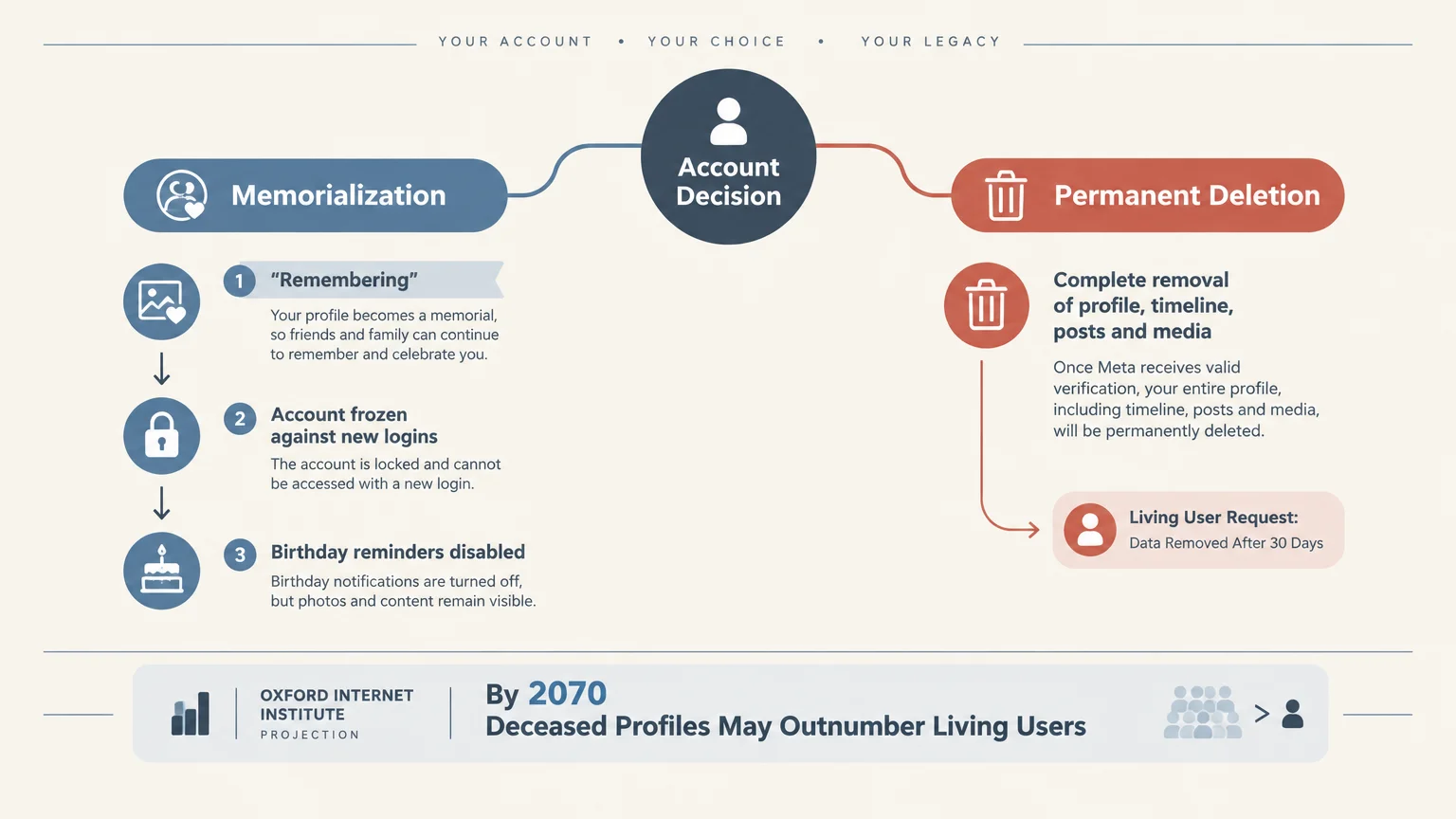
Facebook gives you two clear choices for your main profile before anything happens to you. You can either have your account memorialized as a lasting tribute or permanently deleted once the platform learns of your passing.
Keep in mind that this advance setting applies only to your main Facebook profile. If you run extra profiles for a hobby, book club, or side business, those accounts do not receive the same automatic protection.
Choosing memorialization turns your profile into a quiet, respectful gathering space for friends and family. Facebook places the word Remembering right next to your name so visitors immediately understand the page is a tribute.
At that point, Facebook freezes the account so nobody can ever log in again, blocking hackers and unauthorized changes. The platform also turns off birthday reminders and memory notifications so your family does not receive startling alerts.
All the photos, videos, and stories you shared stay visible to the exact audience you originally chose. Your grandkids can still scroll through your old gardening photos or vacation snapshots whenever they miss you.
If you prefer a clean slate instead, selecting permanent deletion removes your entire profile, photos, posts, and comments after Meta receives valid notice. Many people choose deletion because they view social media as a lively conversation for the living rather than a permanent monument.
Leaving the decision blank leaves your profile in limbo. A 2019 Oxford Internet Institute study in Big Data & Society projected that between 1.4 billion and 4.9 billion Facebook users will pass away before 2100, and deceased profiles could outnumber living users by 2070.
You might wonder whether Meta simply sweeps away inactive accounts on its own. Under Meta’s Terms of Service effective January 1, 2025, the company can disable or delete accounts left unused for an extended period, though it publishes no fixed timeline.
By contrast, when a living user requests immediate deletion, profile data disappears after roughly 30 days. Making your own choice for facebook after death takes the guesswork away from Meta and puts your wishes front and center.
Lifestyle Idea #2: Follow the Exact Meta Accounts Center Path Today
Knowing what you want is great, but clicking the right buttons inside Facebook’s ever-changing menus can feel like a scavenger hunt. Social media plays a huge part in our daily routines, so keeping its settings tidy is time well spent.
The AARP 2026 Tech Trends Survey found that 73% of adults 50 and older use social media, and 72% are on Facebook. Pew Research Center’s 2025 survey also showed 54% of adults ages 50 to 64 visit Facebook every single day.
In fact, a Media Logic survey noted that 43% of older adults spend over an hour a day on social media, with 30% checking Facebook many times daily. You can borrow just five minutes from your morning scroll to lock in your legacy choice.
Sit down at a desktop or laptop computer, because navigating full menus on a larger screen is much easier on the eyes. Log into your Facebook account and look toward the top right corner of your screen.
Click your small circular profile picture, then select Settings & privacy from the drop-down menu. Next, click Settings to open your main account dashboard.
On the left side of the screen, click Accounts Center to open Meta’s unified settings hub. From there, select Personal details and click Account ownership and control.
You will see an option labeled Memorialization; click it and choose your main Facebook account. You can now pick either Memorialize account or Delete after death, then follow the brief on-screen prompts to save your choice.
If you also spend time on Instagram—and Pew Research Center’s 2026 data shows 41% of adults 50 to 64 and 21% of those 65 and older do—do not panic when Instagram does not appear in that Memorialization menu. We will tackle how Instagram handles things in a later section.

Lifestyle Idea #3: Appoint a Trusted Legacy Contact on Facebook
If you choose to memorialize your profile, Facebook lets you name one trusted friend to look after the page. Setting up a legacy contact facebook connection turns a frozen timeline into a well-tended family scrapbook.
Your chosen person must already be your friend on Facebook and be at least 18 years old. You can only pick one person, so choose someone steady, thoughtful, and comfortable using basic social media tools.
Inside that same Memorialization menu, Facebook gives you two helpful extra toggles. You can decide right now whether to notify your chosen friend immediately and whether to allow them to download a copy of everything you shared on Facebook.
Sending a quick message through Facebook’s prompt—or better yet, telling them over lunch—prevents any awkward surprises later. Before you confirm your pick, take a moment to understand the clear boundaries Meta places on this role.
What Your Legacy Contact Can Do
Once your profile is memorialized, your Legacy Contact gains limited caretaker tools designed to honor your memory. They can write a pinned post at the top of your profile to share funeral details, a celebration-of-life invitation, or a final message from you.
They can also update your profile picture and cover photo if your family wants a favorite smiling portrait displayed. In addition, they can respond to new friend requests from distant relatives and manage tribute posts left by friends.
If you toggled on the download permission in advance, they can download an archive of the photos, videos, and posts you shared publicly or with friends. Finally, your Legacy Contact holds the authority to request permanent removal of the memorialized account later if your family decides it is time.
What Your Legacy Contact Cannot Do
Privacy stays strictly protected even after you are gone. Your Legacy Contact can never log into your account, change your password, or pretend to post as you.
Most reassuringly, they cannot read your private Facebook Messenger conversations. Any personal chats you shared with your spouse, kids, or close friends remain completely sealed.
They also cannot remove existing friends from your list, send out new friend requests, or delete or rewrite posts you made while alive. If you choose memorialization without naming a Legacy Contact, nobody will be able to manage or update the memorialized page at all.
Lifestyle Idea #4: Understand Instagram Memorialization and Its Current Gaps
While Facebook gives you clear advance controls, Instagram operates quite differently. Understanding instagram memorialization rules right now helps you avoid false assumptions about your photo gallery.
As of 2026, Instagram offers no advance Legacy Contact feature and no pre-death deletion switch inside the app or Accounts Center. Even though Meta owns both platforms, you cannot pre-select what happens to your Instagram feed before you pass away.
Every action on Instagram must be requested by someone else after your passing through the official Instagram Help Center. Because no one is appointed automatically, knowing how those requests work lets you brief your family ahead of time.
How Instagram Handles a Memorialized Profile
When someone submits a valid memorialization request, Instagram adds a Remembering banner to the profile and locks it down permanently. Nobody can log into a memorialized Instagram account, even if they happen to know your username and password.
No new photos or Reels can be uploaded, and existing captions, comments, and privacy settings remain frozen in place. Your posts stay visible to the exact audience you shared them with, while Instagram removes the account from public areas such as Explore and Suggestions.
Who Can Request Memorialization or Removal
Actually getting the process started depends on what your family wants to happen. According to Instagram’s Help Center as of September 2026, anyone—a friend, neighbor, or relative—can request memorialization by submitting proof of death such as an obituary link, news article, or death certificate.
Permanent removal requires a much stricter standard. Only verified immediate family members or lawful estate representatives can request account deletion, and they must upload documents such as your birth certificate, death certificate, and proof of legal authority.
Keep in mind that Instagram never hands out login credentials or access to private Direct Messages. Meta also confirms as of October 2026 that Instagram has no general public customer-service phone number, meaning your loved ones must submit every request through official Help Center web forms.
Lifestyle Idea #5: Download a Personal Backup of Your Photos and Stories
Social media platforms are wonderful digital bulletin boards, yet they make terrible permanent filing cabinets. Policies shift, accounts get locked by mistake, and family members sometimes struggle to retrieve photos after a loss.
A YouGov survey for the Society of Trust and Estate Practitioners found that 64% of respondents value sentimental digital possessions like photos and videos, yet 57% have made no plans to pass them on. Only 3% had used platform digital legacy tools.
That is why both AARP and the Digital Legacy Association recommend downloading a local backup copy of your Facebook photos, videos, and messages while you are alive. Once that archive sits safely on your own hardware, you hold total control over how you share it.
Inside Facebook’s Accounts Center, look under Your information and permissions and click Download your information. You can choose to download everything or select just your photos, videos, and posts from specific years.
Instagram offers a similar download tool right next to it inside Accounts Center. Requesting an HTML or high-quality media copy takes only a few clicks, and Meta emails you a link once your zip file is ready.
Save that folder onto an external USB hard drive, a computer backup, or a shared family cloud folder. Better yet, turn this practical chore into a joyful weekend project by pulling out your best travel pictures and grandchild milestones.
Printing a physical hardcover photo book from your favorite albums gives your family something warm to hold around the kitchen table. You get to enjoy flipping through those memories today, and your kids gain an heirloom that never requires a password.
Lifestyle Idea #6: Align Your Social Settings with State Digital Legacy Laws
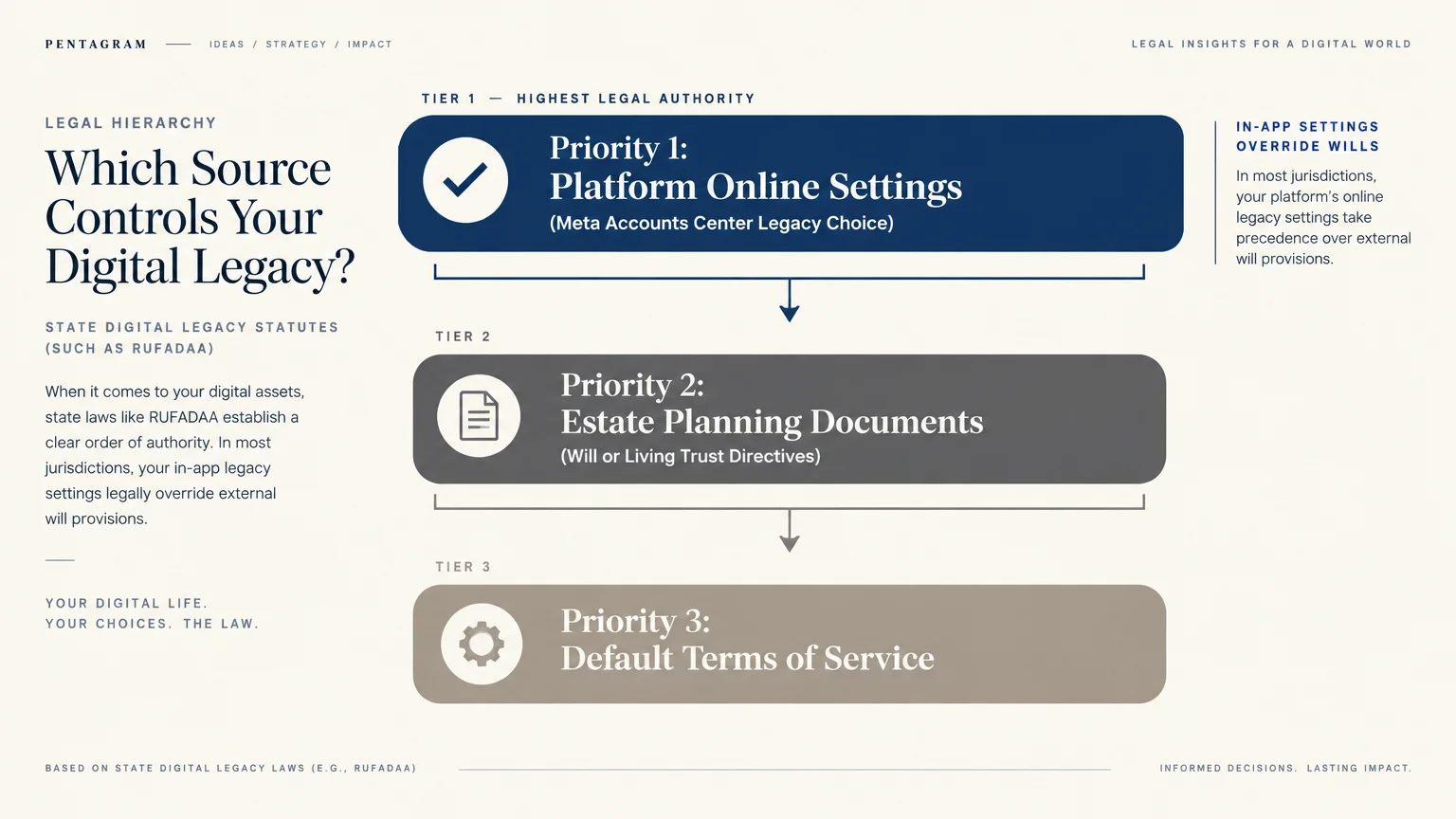
Many people assume that writing a line about Facebook in a paper will settles everything. In reality, digital legacy planning follows a strict legal ladder that puts online platform settings at the very top.
Back in 2015, the Uniform Law Commission drafted the Revised Uniform Fiduciary Access to Digital Assets Act, known as RUFADAA. According to an April 2026 American Bar Association report, 47 U.S. states, the District of Columbia, and the U.S. Virgin Islands have enacted RUFADAA.
Among the remaining states, Delaware operates under the original 2014 UFADAA law, Louisiana follows separate civil-law succession rules, and Massachusetts introduced RUFADAA legislation in 2025. Because nearly the entire country relies on this framework, understanding its three-tier priority order protects your wishes.
The Three-Tier Legal Priority Ladder
First, online legacy tools offered directly by a platform—such as Facebook’s Legacy Contact—hold top legal priority. Your in-app Facebook selection legally overrides any conflicting instruction written later in your will or trust.
Second, if you never used an online tool, explicit written instructions inside a will, trust, or power of attorney govern what happens next. Even then, without your explicit written consent in those documents, executors generally cannot read private electronic messages.
Third, if you leave neither an online tool choice nor written estate instructions, the platform’s Terms of Service Agreement and state law take over completely. Naming your Legacy Contact inside Facebook today ensures your personal choice wins at tier one.
Why a Password Notebook Falls Short
Some seniors keep a spiral notebook of usernames and passwords in a desk drawer hoping it solves everything. Legal guides from the ACTEC Foundation and Nolo warn that sharing passwords alone creates unexpected headaches.
Federal laws like the Stored Communications Act and the Computer Fraud and Abuse Act, paired with platform Terms of Service, restrict unauthorized third-party logins even by well-meaning spouses or executors. Meta explicitly states that it never provides login credentials for another person’s account.
Even practical hurdles get in the way, since two-factor authentication codes sent to a deactivated phone can lock relatives out instantly. Using official legacy tools and documenting your wishes clearly with an estate attorney keeps your family completely on the right side of the law.
Lifestyle Idea #7: Share Your Digital Wishes with Family Over Coffee
Handling social media after death does not have to feel morbid or heavy. Think of it as an extension of organizing your photo albums and sharing family stories while everyone is gathered together.
Once you pick your Facebook Legacy Contact, invite them for coffee or give them a quick phone call. Let them know you chose them because you trust their judgment and kindness, and make sure they feel comfortable taking on the role.
Talk openly with your spouse and adult children about what you want for both Facebook and Instagram. Some families find deep comfort in visiting a memorialized page on anniversaries, while others prefer keeping private photo backups and closing public profiles quietly.
Write down a simple one-page digital guide to store alongside your will or important household papers. List the exact usernames or email addresses linked to your Facebook and Instagram accounts so your family does not have to hunt through lookalike profiles.
Note clearly on that sheet whether you selected memorialization or deletion on Facebook, who your Legacy Contact is, and what you want requested on Instagram. Remind your family where your downloaded photo backup drive lives, too.
Having this gentle chat removes guilt and second-guessing later. Your loved ones can focus on supporting each other instead of arguing over whether Mom or Dad wanted their profile kept online.

Putting It into Practice: Small Steps for Big Changes
You do not need to overhaul your entire digital life in a single afternoon. Break the job into three bite-sized steps over the next week so it feels effortless and rewarding.
First, set aside ten quiet minutes today to open Facebook on your computer, visit Accounts Center, and choose Memorialize or Delete after death. If you pick memorialization, select your Legacy Contact and toggle on the download permission right away.
Second, pick one rainy afternoon this weekend to request your downloadable archive of photos and videos from both Facebook and Instagram. Copy that folder onto a labeled flash drive and tuck it safely in a fireproof home box.
Third, mention your choices to your Legacy Contact and write your account handles on a summary sheet for your family files. When you review your broader retirement paperwork, trusted national portals make double-checking life details simple.
For resources on retirement living, travel, and finance, visit AARP. Official information on Social Security is available at SSA.gov.
For travel advisories, consult the U.S. Department of State. Taking care of these small digital details leaves you freer to focus on the travel, hobbies, and friendships waiting for you right now.
Frequently Asked Questions
What if I am not tech-savvy and worry I might accidentally delete my account today?
Opening the Memorialization menu inside Meta Accounts Center will never delete your live account immediately. Facebook clearly labels the post-death option as taking effect only after someone notifies the platform of your passing.
If you feel nervous clicking through settings alone, ask a tech-comfortable grandchild, adult child, or friend to sit beside you with a cup of tea. You stay in the driver’s seat, and they can help double-check each screen before you click save.
Can my spouse or executor just log into my account with my password after I pass away?
Even if someone knows your password, logging into another person’s Facebook or Instagram account violates platform Terms of Service and can trigger legal restrictions. Meta also blocks logins permanently as soon as an account is memorialized.
Naming a Legacy Contact on Facebook and backing up your favorite photos locally gives your family safe, official ways to preserve memories without breaking rules or hitting locked security screens.
What if I want my Facebook deleted after death, but my kids want to keep my photos?
You can easily satisfy both wishes by downloading your Facebook photo and video archive today before setting your profile to delete after death. Share that saved folder with your kids on a flash drive or family cloud album now.
That way, your children keep every treasured family snapshot forever, while your public Facebook profile disappears cleanly according to your personal preference.
How do I make sure my Instagram wishes are honored since there is no Legacy Contact setting?
Write your Instagram handle and your exact preference—either memorialization or permanent removal—on a simple instruction sheet stored with your estate papers. Tell your immediate family members where to find that sheet and remind them that requests go through the Instagram Help Center web form.
Because permanent deletion on Instagram requires proof of legal authority and a birth and death certificate, naming an executor in your formal estate plan makes that process much smoother for your family.
Disclaimer: This article provides lifestyle suggestions for informational purposes. Financial, legal, or travel decisions should be made in consultation with qualified professionals.